Ever watched a user type a destination in the wrong language and wonder why they bail on the booking? A single typo in a reservation form can cost you a sale and damage trust. For web-based booking tools that serve international customers, multilingual spell check is not a luxury, it’s a necessity. In this article, we’ll walk through the top tools that bring real-time, multi-language correction to your booking interface, helping you reduce errors, boost conversions, and keep guests happy.
1. TypoGuard AI , Real-Time Spell Check for Booking Platforms

If you run a booking platform, whether it’s for hotels, tours, or spa appointments, your users type in chat boxes and forms every day. And they make mistakes. TypoGuard AI is built specifically for this. It’s a Chrome extension that proofreads text in real time inside web chat boxes, email clients, and booking tools. Unlike generic spell checkers, TypoGuard hooks directly into the reservation workflow, catching errors before they reach your system.
What makes TypoGuard stand out? It uses AI-powered suggestions that adapt to context. If a guest types “resevation” instead of “reservation,” TypoGuard fixes it on the spot. It supports multiple languages, though the exact list is expanding. And because it’s a Chrome extension, there’s no need for heavy API integration, just install and go. For teams that need a quick, reliable fix without developer overhead, TypoGuard is the obvious choice.
One area where TypoGuard shines is in live chat. Booking agents often juggle multiple conversations. One misplaced letter can change a date or name. TypoGuard corrects as you type, so your agent never sends a typo. That means fewer callbacks and happier customers.
2. Open-Source Multilingual Spell Checker
This open-source tool is one of the most popular open-source grammar and spell checkers. It supports over 25 languages, making it a strong option for booking platforms that need broad language coverage. You can use it as a browser extension, a standalone app, or integrate it via API. For web-based booking tools, the API route is most flexible, you can run checks on user input before storing it.
The tool catches grammar, spelling, and style issues. It’s especially good at detecting errors in longer texts, like booking notes or special requests. Because it’s open-source, you can host it on your own server, which helps with privacy. That matters when booking data includes names, phone numbers, and payment details.
Its API pricing starts at a reasonable rate for small businesses. You get full control over dictionaries, useful if your booking system uses industry terms like “B&B” or “all-inclusive.” The main downside? Real-time performance can lag if you process many requests at once. For high-traffic forms, you might need to optimize caching or batch checks.
If you have a development team, this open-source option is a solid foundation. You can customize rules, add your own words, and even tweak the suggestion algorithms. But if you want a plug-and-play solution that works out of the box, you may prefer a dedicated Chrome extension like TypoGuard AI.
3. AI-Powered Writing Assistant with Multilingual Support
An AI-powered writing assistant is one of the best-known tools in this category. It checks grammar, spelling, punctuation, and even tone. For booking tools, such an assistant’s browser extension works across most web apps, including your booking interface. It highlights errors in real time and offers suggestions with a single click.
This writing assistant supports English, but its multilingual capabilities are limited to English variants (US, UK, Canada, Australia). If your booking platform primarily serves English-speaking customers, this tool is a reliable choice. But if you need Spanish, French, or German for guest messages, you’ll need something else.
Some AI-powered assistants also have a business plan that gives admins control over style guides and brand tones. That’s handy if your support team should use specific phrases like “We’d be happy to help” instead of “Sure.” However, the free tier only catches basic errors; premium features like tone detection cost extra.
The biggest limitation for booking tools? This type of assistant doesn’t integrate natively with booking APIs. It works on the client side, so it can’t validate data before submission. For server-side checks, you’d need another solution. Still, for user-facing chat and comments, it’s a decent aid.
4. Real-Time Spell Check API for Customer-Facing Forms
This API is designed for business teams: customer support, sales, and yes, booking platforms. According to the API documentation, it catches up to 60% more errors than traditional spell checkers by using a learning-based approach. That’s a big deal when a single typo in a booking confirmation can cause confusion.
It offers an API and SDK that you can embed directly into your booking forms. It checks text as users type, correcting spelling and grammar in multiple languages. The list of supported languages includes English, Spanish, French, German, Portuguese, and more. You can also add custom dictionaries for brand names (like your hotel chain) or industry jargon.
One standout feature: it provides autocomplete suggestions for common booking phrases. If a user starts typing “I’d like to book…,” it can finish the sentence. That speeds up data entry and reduces errors. The API handles both client-side and server-side checks, so you can validate inputs before they hit your database.
Pricing is usage-based, making it scalable for small and large platforms. For development teams, a free trial API key is available to test integration. Compared to TypoGuard AI, this solution requires more technical setup but gives you finer control over the correction logic.
5. Multilingual Contextual Spell Check Tool
This provider has been around since 2010. It provides grammar and spell checking with a focus on context. That means it doesn’t just flag misspellings, it understands the intended word based on the surrounding text. For booking forms where “suite” might be typed as “sweet,” this tool catches the error.
Its API allows you to embed its checking engine into your web app. It supports over 40 languages, so it’s a strong candidate for truly multilingual platforms. The API can process large volumes, making it suitable for high-traffic booking sites.
One limitation: The free tier is limited, and the API pricing is not publicly listed, you need to contact sales. That makes budgeting harder. Also, its browser extension is more popular than its API, so finding integration examples might take extra research.
If your booking tool handles text in many languages and you have a developer to manage the integration, this tool is worth evaluating. But if you want an easier on-ramp, TypoGuard’s Chrome extension might be faster to implement.
6. Multilingual API Grammar and Spell Check SDK
This SDK offers a powerful API for grammar, spelling, and style checking. It supports 11 languages including English, French, German, Spanish, Portuguese, Russian, Italian, Arabic, Japanese, Chinese, and Greek. It also handles dialects like en-US, en-GB, de-DE, and more. That’s useful when your booking platform serves different regions.
According to the documentation, the API provides endpoints for text checking, autocorrection, readability analysis, and even language detection. You can send user input in real time and get back suggested fixes. The servers are located in the US, Europe, and Asia, so latency is low for most users.
It also offers a custom exceptions feature. If your booking system uses specific vocabulary (like “hot tub” or “concierge”), you can mark those words as correct. This prevents false positives. The API returns detailed error categories, which helps you fine-tune the checking logic.
Pricing is usage-based with a free tier for limited requests. For a small booking site, the free tier might be enough. But as you scale, costs can rise. Still, it is a flexible option if you want to build a custom spell check workflow.
7. Enterprise Spell Check for Web Apps
One enterprise-grade solution supports over 100 languages with context-aware corrections. That’s more than any other tool on this list. It offers a REST API for embedding into custom platforms, plus pre-built plugins for popular rich text editors.
The SDK is open-source and integrates with Angular, React, and Vue.js. You can deploy it in the cloud or on-premises. For booking platforms with strict data privacy (e.g., handling healthcare or payment info), on-premises deployment keeps all data on your server. That’s a major plus.
It also includes an AI writing assistant for paraphrasing and style suggestions. But this comes at a cost; pricing starts at a few hundred dollars per month for the Starter plan. For small booking startups, that might be overkill. But if you have enterprise clients and need strong multilingual support, it’s a top contender.
One downside: the setup is more complex than a browser extension. You’ll need developer time to integrate the API and configure custom dictionaries. But if you need 100+ languages and full data control, this solution is unmatched.
8. Simple API for Multilingual Spelling
This lightweight offering provides a straightforward API that checks spelling and grammar in multiple languages. It’s not as feature-rich as some others, but it gets the job done for basic correction. The API accepts text and returns suggestions in JSON format. You can integrate it with a few lines of code.
For a booking platform that just needs to catch obvious typos in user input, this is a lightweight option. It’s affordable and easy to set up. However, it doesn’t provide the deep context analysis that more feature-rich tools offer. And its language support is limited compared to some competitors.
If you want a quick, no-fuss integration without a big learning curve, this option is worth a look. But if you need advanced features like autocomplete or tone checking, you’ll want a more complete solution.
9. Contextual Spell Check and Translation API
This API is known for its translation tools, but it also offers a spell checker that works in English, Spanish, French, and more. The API uses AI to understand context and provide accurate corrections. For booking platforms that serve multilingual guests, this API can help ensure that messages are both correct and culturally appropriate.
This API integrates easily with web apps. It provides real-time suggestions as users type. However, the language support is narrower than some other tools, only about 4-5 languages. If your platform needs only English, Spanish, and French, this API could be a good fit. But for broader coverage, look elsewhere.
This API also offers a translation API that works alongside spell check. That could be useful if your booking tool lets guests message staff in their native language. But keep in mind that translation accuracy varies, and you may need human review for critical communications.
10. Open-Source Spell Check Engine
An open-source spell and grammar checker is available for those with development resources. It was originally developed by the company behind a major publishing platform. While it’s no longer actively maintained, the code is still available and can be self-hosted. This engine supports English, French, German, Portuguese, and Spanish.
If you have a developer who can set up and maintain a self-hosted service, this open-source option provides a decent foundation. It can be configured with custom dictionaries. However, because it’s not updated frequently, it may miss newer words or slang. For a booking platform that uses standard language, it could work, but you’ll need to invest time in maintenance.
Given its age and limited support, this solution is best suited for hobby projects or as a fallback. Most commercial booking tools will benefit more from a modern, actively developed solution.
11. Lightweight Spell Check Library with Multilingual Dictionaries
This library is the engine behind many popular spell checkers, including LibreOffice, Firefox, and Chrome. It’s a lightweight library that can be embedded into any application. It uses dictionary files, which are available for dozens of languages. For a booking platform, you could integrate this library directly into your backend to validate input.
As noted on a Fedora discussion forum, installing its dictionaries is as simple as running a package manager command. That makes it easy to add language support. However, this library only checks spelling, not grammar or style. For basic typo detection, it’s enough, but for full grammar correction, you’ll need additional tools.
This library is ideal for developers who want a free, lightweight solution. It’s used in many popular software, so it’s well-tested. But if you don’t have a development team, using this library means building a user interface and handling real-time suggestions yourself. That’s a lot of work compared to a ready-made extension like TypoGuard AI.
The library’s main advantage is speed. It can process thousands of words per second. For high-traffic booking APIs where latency matters, this library is a great choice, provided you’re comfortable with the integration overhead.
How to Choose the Right Multilingual Spell Check Tool
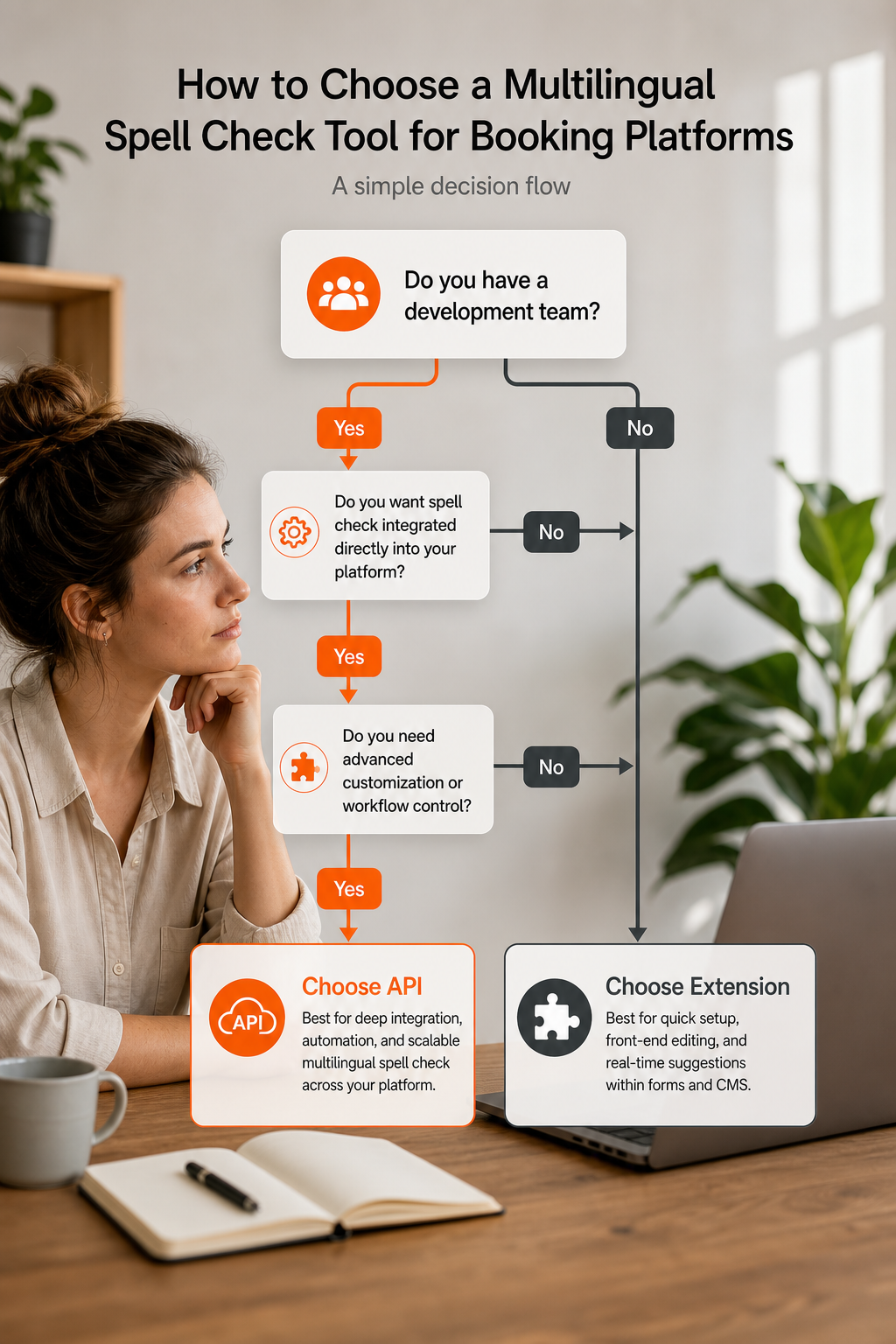
With so many options, how do you pick the best one for your booking platform? Start by answering a few questions:
- Do you have development resources? If yes, you can consider APIs from various providers. If no, a browser extension like TypoGuard AI or other popular extensions is faster to deploy.
- How many languages do you need? If you serve a dozen languages, there are robust providers offering broad language support. For a few languages, more focused solutions may suffice.
- What’s your budget? Free open-source tools are cost-effective but require setup. Paid APIs charge per request; extensions often have monthly subscriptions. TypoGuard AI offers a free trial with affordable premium plans.
- Is data privacy a concern? On-premises solutions from some providers keep data on your server. Cloud APIs send data to third-party servers, which may be an issue for sensitive booking info.
- Real-time vs. batch? For live chat, real-time correction is critical. TypoGuard AI and other real-time extensions excel here. For form submission validation, server-side APIs can check text in batches.
A good approach is to test a few options. Most tools offer free trials or sandboxes. Run a pilot with actual booking data and see which catches errors without slowing down your workflow. And don’t forget to ask your support team, they’re the ones typing all day. Their input will guide you to the right choice.
Comparison Table: Multilingual Spell Check Tools for Booking
Use this table to quickly compare options. For most booking platforms, TypoGuard AI offers the fastest path to error-free typing, especially for live chat and forms. If you need deeper integration, consider dedicated third-party APIs. For large enterprises, enterprise-grade solutions are hard to beat.
Frequently Asked Questions
What is the best multilingual spell check tool for web-based booking tools?
The best tool depends on your needs. For real-time correction in chat and forms with zero developer effort, TypoGuard AI is the top pick. It integrates directly with booking interfaces and supports multiple languages. If you need API integration for backend validation, other API-based tools are strong options.
Can I use a browser extension for spell check on my booking platform?
Yes, Chrome extensions like TypoGuard AI and other similar tools work on most web apps. They highlight errors as you type. However, extensions only work client-side. For server-side validation (e.g., before storing data), you’ll need an API. TypoGuard AI covers real-time client-side needs, while APIs handle backend checks.
How many languages do these tools support?
It varies. Some tools lead with 100+ languages, others support 25+, and some cover 10-11. TypoGuard AI’s language list is growing; it supports major languages. If you need coverage for rare languages, check the vendor’s current documentation.
Do these tools protect customer data privacy?
Some offer on-premises deployment to keep data on your servers. Others process data in the cloud. For booking data that includes personal information, consider self-hosted options. TypoGuard AI runs entirely in the browser, so no data leaves the user’s device.
Can I customize the dictionary for industry terms?
Most tools allow custom dictionaries. Several tools let you add words like “B&B” or “concierge.” TypoGuard AI also supports adding custom terms. This prevents false positives and improves accuracy for your specific booking context.
How long does it take to integrate a spell check API?
With good documentation, you can integrate a basic API in a few hours. More complex tools may take days due to on-premises setup. Browser extensions like TypoGuard AI take minutes, just install and start typing.
Are there free options for multilingual spell check?
Yes. Some tools offer a free tier with limited checks. Others have a free plan with request limits. Some completely free options require development work. TypoGuard AI offers a free trial so you can test before committing.
What is the cost of these tools?
Prices range from free to several hundred dollars per month. TypoGuard AI has a free trial and affordable premium plans. API tools charge per usage. Some providers start around $200/month. Contact vendors for exact pricing, as it can vary based on volume.
Conclusion
Multilingual spell check is essential for building trust with international customers. A single typo can lead to a missed booking or a frustrated guest. The tools we’ve covered offer different approaches: browser extensions for instant help, APIs for deep integration, and enterprise solutions for large-scale needs.
For most booking platforms, the fastest win is a Chrome extension that works out of the box. TypoGuard AI fits that bill perfectly. It corrects errors in real time across chat and forms, supports multiple languages, and doesn’t require developer involvement. If you want to see it in action, start your free trial today and notice the difference in your agents’ confidence and customer satisfaction.
But don’t stop there. Combine it with an API for backend validation to catch errors before they reach your database. That two-layer approach, client-side extension plus server-side API, gives you the best coverage. Evaluate your team’s resources, language needs, and budget, then pick the combination that works for you. Your customers will thank you with repeat bookings.